二次开发- 修改界面-增加“其他操作”菜单
在``其他操作活动''弹出菜单中添加条目
先决条件:您应该是具有PHP和Javascript能力的开发人员
学习:在“其他操作活动”弹出菜单中添加条目
水平:[ ttps://]高级
域:[ ttps://]PHP, [ ttps://]Presentation
最低版本:2.0.0
从iTop 2.0.0开始,该框架支持在iTop中存在的所有弹出菜单中添加新菜单项:在列表中(“ Other操作活动…”和“工具包”菜单中),列表中的“ Other操作活动…”中。操作活动的详细信息,“注销”菜单中的等等。
通过提供实现iPopupMenuExtension接口的PHP类,添加了新的弹出菜单项。
要在iTop页面左侧的主菜单中插入新条目,请参阅XML引用 关于菜单。
此示例演示以下内容:
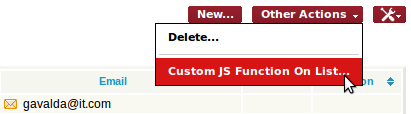
- 在iTop中的任何对象列表上,此扩展都添加一个新菜单项(在“其他操作活动…”弹出菜单中),该菜单项仅调用自定义javascript职能并使用列表中的元素数执行“告警(…)”
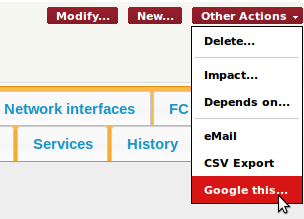
- 在iTop中任何对象的“详细信息”页面上,扩展程序都会添加一个额外的菜单项“ Google this…”,以打开Google搜索页面(在新的选项卡窗口中),并在搜索文本中填充选定的itop对象的名称。
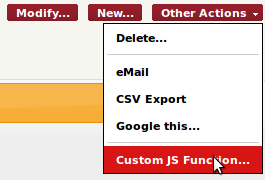
- 在联系人(即团队或人员)的“详细信息”页面上,添加了两个额外的菜单项:
- 分隔线(仅适用于iTop 2.0.1-beta或更高版本)
- 调用自定义JS职能…的菜单项,只是弹出带有对象名称的告警(…)
PHP代码有趣的部分位于文件main.sample-add-menu.php中。自定义JS函数位于文件js/sample.js中。
随时修改此样本以将其调整为需求…,并从中做出一些有用的事情。
为了将新的弹出菜单项添加到iTop中,必须提供实现iPopupMenuExtension接口的类。这个新类必须包含在iTop文件的包含链中的某个位置。文件的位置并不重要。确保文件正确包含在iTop中的最简单方法是将其添加到iTop模块定义文件中声明的“数据模型”文件列表中。
在我们的示例中,我们将代码放入名为main.sample-add-menu.php的PHP文件中。通过将其名称添加到module.sample-add-menu.php的数据模型文件列表中,确保包含此文件:
<?php // // iTop module definition file // SetupWebPage::AddModule( __FILE__, // Path to the current file, // all other file names are relative to the directory containing this file 'sample-add-menu/', ( // Identification // 'label' => 'Add Menu Sample', 'category' => 'business', // Setup // 'dependencies' => ( ), 'mandatory' => false, 'visible' => true, // Components // 'datamodel' => ( 'main.sample-add-menu.php', 'model.sample-add-menu.php' ), 'webservice' => ( ), 'data.struct' => ( // add your 'structure' definition XML files here, ), 'data.sample' => ( // add your sample data XML files here, ), // Documentation // 'doc.manual_setup' => '', // hyperlink to manual setup documentation, if any 'doc.more_information' => '', // hyperlink to more information, if any // Default settings // 'settings' => ( // Module specific settings go here, if any ), ) );
然后,让我们创建实现iPopupMenuExtension接口的类:
[ ttps://]main.sample-add-menu.php
<?php
/**
* Sample extension to show how adding menu items in iTop
* This extension does nothing really useful but shows how to use the three
possible
* types of menu items:
*
* - An URL to any web page
* - A Javascript function call
* - A separator (horizontal line in the menu)
*/
class AddMenuSampleExtension implements iPopupMenuExtension
{
/**
* Get the list of items to be added to a menu.
*
* This method is called by the framework for each menu.
* The items will be inserted in the menu in the order of the returned array.
* @param int $iMenuId The identifier of the type of menu, as listed by the
constants MENU_xxx
* @param mixed $param Depends on $iMenuId, see the constants defined above
* @return object[] An array of ApplicationPopupMenuItem or an empty array if no
action is to be added to the menu
*/
public static function EnumItems($iMenuId, $param)
{
$aResult = ();
switch($iMenuId) // type of menu in which to add menu items
{
/**
* Insert an item into the Actions menu of a list
* $param is a DBObjectSet containing the list of objects
*/
case iPopupMenuExtension::MENU_OBJLIST_ACTIONS:
// Add a new menu item that triggers a custom JS function defined in our
own javascript file: js/sample.js
$sModuleDir = ((__FILE__));
$sJSFileUrl = utils::GetAbsoluteUrlModulesRoot
().$sModuleDir.'/js/sample.js';
$iCount = $param->(); // number of objects in the set
$aResult[] = new JSPopupMenuItem('_Custom_JS_', 'Custom JS Function On
List...', "MyCustomJSListFunction($iCount)", ($sJSFileUrl));
break;
/**
* Insert an item into the Toolkit menu of a list
*
* $param is a DBObjectSet containing the list of objects
*/
case iPopupMenuExtension::MENU_OBJLIST_TOOLKIT:
break;
/**
* Insert an item into the Actions menu on an object's details page
*
* $param is a DBObject instance: the object currently displayed
*/
case iPopupMenuExtension::MENU_OBJDETAILS_ACTIONS:
// For any object, add a menu "Google this..." that opens google search in
another window
// with the name of the object as the text to search
$aResult[] = new URLPopupMenuItem('_Google_this_', 'Google this...',
"h ?q=".$param->GetName(), '_blank');
// Only for Contact: (i.e. Teams and Persons)
if ($param instanceof Contact)
{
// add a separator
$aResult[] = new SeparatorPopupMenuItem();
// Add a new menu item that triggers a custom JS function defined in our
own javascript file: js/sample.js
$sModuleDir = ((__FILE__));
$sJSFileUrl = utils::GetAbsoluteUrlModulesRoot
().$sModuleDir.'/js/sample.js';
$aResult[] = new JSPopupMenuItem('_Custom_JS_', 'Custom JS Function...',
"MyCustomJSFunction('".($param->GetName())."')", ($sJSFileUrl));
}
break;
/**
* Insert an item into the Dashboard menu
*
* The dashboad menu is shown on the top right corner of the page when
* a dashboard is being displayed.
*
* $param is a Dashboard instance: the dashboard currently displayed
*/
case iPopupMenuExtension::MENU_DASHBOARD_ACTIONS:
break;
/**
* Insert an item into the User menu (upper right corner of the page)
*
* $param is null
*/
case iPopupMenuExtension::MENU_USER_ACTIONS:
break;
}
return $aResult;
}
}
上面的代码中引用的两个自定义 Javascript 函数在文件 js/示例中实现.js:
sample.js
// Sample JS function to be called from a custom menu item
function MyCustomJSFunction(sName)
{
// nothing fancy here, just popup an alert
alert(sName);
}
// Sample JS function to be called from a custom menu item
// on a list of objects
function MyCustomJSListFunction(iCount)
{
alert('There are '+iCount+' element(s) in this list.');
放在一起
下载以下文件以获取完整的示例扩展:
[ ttps://]sample-add-menu.zip
与其他任何iTop扩展一样:
- 将zip文件的内容扩展到iTop根目录下的扩展文件夹中(如果需要,请创建扩展文件夹)
- 确保Web服务器具有足够的权利来读取扩展文件夹中的所有文件
- 删除配置文件上的只读标志(位于conf/production/config-itop.php中)
- 将浏览器指向http ::: <itop-root >>安装程序,再次启动iTop安装程序。
- 在安装向导的最后一步中,从扩展的列表中选择“添加菜单示例”。